
 Perfect Keylogger
 |
Smart Type Assistant for Windows - make your keyboard as smart as you! |
This tool is now freeware!
Are you working with texts every day, typing the same phrases over and over again? Often mistype? Smart Type Assistant is here to help! It's easy-to-use, time-saving utility for all Windows operating systems.
Initially, Smart Type Assistant's basic purpose was to add some time-saving Microsoft® Word™ features to every application you use. Then it has evolved into an advanced typing automation tool, intended to make your typing faster and error-free.
Smart Type Assistant features include Autoreplace (expanding short keywords into full phrases), Autocorrect (common typing errors, two initial capitals, and accidental usage of the Caps Lock key), various operations with the selected text, pasting large text pieces with a hotkey, Clipboard History and much more.
Note: there are many programs with functionalities similar to Autocorrect, for example MS Office. The advantage of Smart Type Assistant is that it gives you the uniform functionality system-wide, so all your applications instantly become autocorrect-enabled, and benefit from other STA features.
Try it in your web browser, your favorite instant messenger or your e-mail program - in every program you type text!
Starting from July 2011, we are giving away this app!
Just register your download with this license key:
Name: Smart Type Assistant
Key: HTNG-CWVV-HKES-UCTC
Note: some of our users reported that Smart Type Assistant has been recognized by their antivirus as a threat. That was a false positive - this software is absolutely clean and safe. If you notice a similar problem, please contact us immediately.

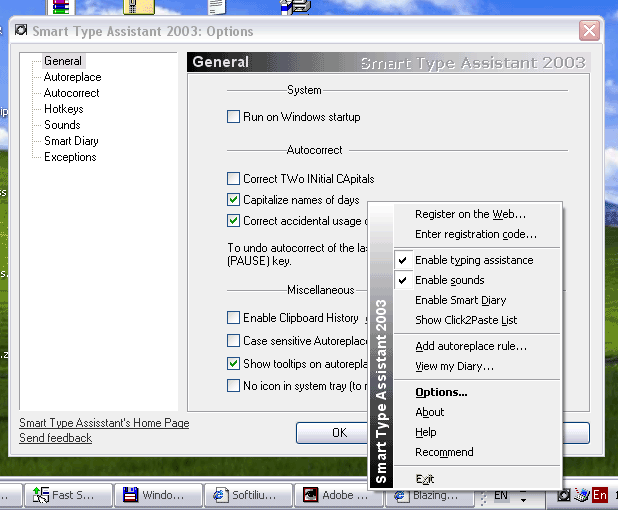
Click on the image to enlarge
Features:
- Autoreplace (expanding short keywords into full phrases).
Examples:
BTW -> By the way;
withb -> With best regards;
i@ -> myemail@yahoo.com ;
ww. -> http://www.myhomepage.mylovesthost.com;
Weh -> We hope you will be pleasantly surprised by our service. - Autocorrect (fix common typing errors on the fly) Examples:
adn -> and;
fromthe -> from the;
seperate -> separate;
i -> I;
The difference beetween Autoreplace and Autocorrect is that Autocorrect works without your intervention while you are typing, but Autoreplace requires you to press Enter or Tab to expand the phrase. - Smart Diary
Logs and saves the texts you type to prevent losing of data when system crashes and organize your text archive (removed from the latest build due to recommendations of security software companies, available in a previous build) - Clipboard history
Stores to the last 15 Clipboard contents for instant pasting. - Clipboard spellchecking
- Quick Text Paste
A feature for quick filling of forms and frequent text fragments. - Correct two initial capitals
Example: HEllo -> Hello; OUr -> our. - Correct accidental usage of Caps Lock
Example: qUICK -> Quick. - Paste text with hotkey
You can set a hotkey to display the list of phrases or large text templates. - Change case of selected text
To invert the case of a text fragment, select it and press Break key. - Music keyboard
You can assign an individual sound for each key to the keyboard. - Windows operations
Keystrokes to minimize, maximize, restore the active window. - Exceptions
Specify programs where STA will be disabled.
Smart Type Assistant Awards
 |
FileHungry.com award. |
 | Download2you.com - 5 stars! |
 | Top4Download.com - 5 stars! |
 | DownloadSofts.com - Clean and Safe! |
 |
FileTransit.com award. |
Supported platforms:
All 32-bit Windows versions
See also:
Amac Keylogger for Mac free alternative
Aobo Keylogger for Mac free alternative
Elite Keylogger for Mac free alternative
HowerWatch Keylogger for Mac free alternative
Kid Logger Keylogger for Mac free alternative
LogKext free keylogger for Mac free alternative
Realtime Spy Keylogger for Mac free alternative
Refog Keylogger for Mac free alternative
Sniper Spy Keylogger for Mac free alternative
Spyrix Keylogger for Mac free alternative
Actual Keylogger for Windows free alternative
All in One Keylogger for Windows free alternative
Elite Keylogger for Windows free alternative
Kid Inspector for Windows free alternative
Kid Logger for Windows free alternative
PCTattletale Spy Software for Windows free alternative
Refog Keylogger for Windows free alternative
Spyrix Keylogger for Windows free alternative
Related:
| Copyright ©2002- Blazingtools Software |