
 Perfect Keylogger
 |
Right Zoom for Mac - modify your Full Screen button behavior. Welcome to the App home page |
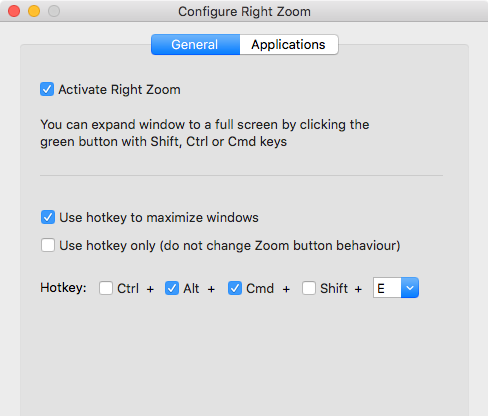
This small tool changes the default behavior of the green "Full Screen" button on a Mac. It will expand the user defined windows, without activating the "Full screen" mode and hiding the Dock and the Menu.
Attention: if you cannot install this app because of macOS warning, please click the downloaded file in Finder with a Ctrl key or with a right mouse button, and choose Open from the popup menu. Repeat that twice in macOS 10.15 or higher.
Download Right Zoom trial version v. 3.0 for macOS 10.10-14 (supports Apple Silicon or Intel Macs)
Support the project!

We strongly recommend to make your own list of apps where you'd like to use the Right Zoom, because some applications may behave incorrectly with Right Zoom enabled, or you just don't need any changes in those apps.
Right Zoom is a background process utility, that runs consuming very little resources. It will not slow your system down at all.
Application requirements: macOS 10.10-14.x, Intel or Apple ARM CPUs.
Special thanks to BrightHub.com for writing the first detailed articles about this application.
Keywords: Right Zoom for macOS 14 Sonoma, Right Zoom for macOS 13 Ventura, Right Zoom for macOS 12 Monterey, Right Zoom for macOS 11 Big Sur, Right Zoom for macOS 10.15.x Catalina, Right Zoom for macOS 10.14.x Mojave, Right Zoom for Mac OS 10.13.x High Sierra, Right Zoom for macOs 10.12 Sierra, Right Zoom for macOS 10.11 El Capitan
Related:
| Copyright ©2002- Blazingtools Software |